
Test your UltraBreeze solar panel with a multimeter at the plug hanging from the fan in the attic.
Tools
- Multimeter (any brand)
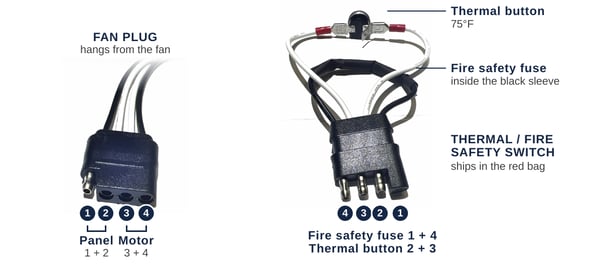
Fan plug: solar panel 1 + 2, motor 3 + 4. Thermal: fire safety fuse 1 + 4, thermal button 2 + 3.
Steps
- Test in full sun. Clouds make the panel read low, and direct shade can make it read very low.
- Unplug the thermal: find the plug hanging from the base of the fan and pull the two black connectors apart. This cuts the solar power to the fan. Pull on the connectors, not the wires.
- Set the meter to DC volts (V with a straight line): auto, or the first setting above 20.
- Touch the meter leads to positions 1 and 2 on the fan plug.
- 18 to 20 V means the panel is good. A minus sign only means the leads are reversed; the reading still counts.
- Near zero in full sun means the panel or its connection has failed. Check the connector between the panel and the fan on the roof, then see UltraBreeze: Replacing the Solar Panel or contact us.
- Plug the thermal back in. Push the connectors together until no metal shows between them.
Can't reach the fan from the attic? The panel can also be tested from the roof at the short pigtail on the panel's junction box. Contact us for the roof testing guide.
Need help? Contact UltraBreeze technical support at support@atticbreeze.com or (254) 865-9999, Monday through Friday, 8 AM to 5 PM Central.