
Test your Gen3 UltraBreeze motor from inside the attic. It takes about a minute.
Tools
- 9-volt battery
- 2 short pieces of wire, one wrapped around each battery terminal
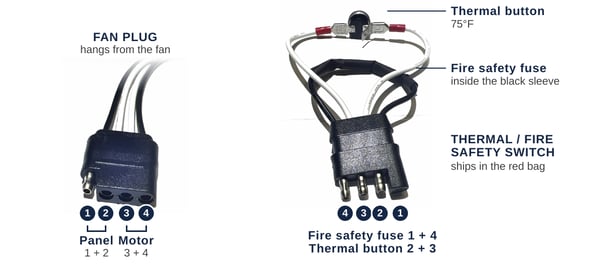
Fan plug: solar panel 1 + 2, motor 3 + 4. Thermal: fire safety fuse 1 + 4, thermal button 2 + 3.
Steps
- Unplug the thermal: find the plug hanging from the base of the fan and pull the two black connectors apart. This cuts the solar power to the fan. Pull on the connectors, not the wires.
- On the fan plug, find positions 3 and 4. They go to the motor. (Positions 1 and 2 go to the solar panel.)
- Touch one battery wire to position 3 and the other to position 4. Either way around is fine.
- Any spin means the motor is good. No spin means the motor needs replacing; contact us and we'll send one.
- Plug the thermal back in. Push the connectors together until no metal shows between them.
Older Gen1 fan? See UltraBreeze: Testing the Gen1 Motor. To swap a motor, see UltraBreeze: Replacing the Motor (from the Attic) or watch the motor replacement video.
Need help? Contact UltraBreeze technical support at support@atticbreeze.com or (254) 865-9999, Monday through Friday, 8 AM to 5 PM Central.